
Year-End Marketing Health Check: 30 Minutes to Prepare Your SME for 2027
The end of the year is the cheapest moment to find out what's leaking enquiries. This 30-minute check walks a Malaysian SME owner through six small audits (website, Google profile, search, AI assistants, social and enquiry tracking), then points to the dates worth planning around in 2027.
If you run a cafe in Subang, a salon in Cheras or a shop in Penang, your marketing probably grew in pieces during the year: a website update here, a new Instagram bio there, a Google profile you set up once and never opened again. By December those pieces rarely match.
You don't need an agency to spot the big problems. You need a timer, your phone, a laptop and 30 minutes. This guide gives you six 5-minute blocks. Each one tells you what to look at and what "good enough" looks like, so that by the end you have a short fix list instead of a vague feeling that you should "do more marketing". If you'd rather have a specialist look, our SEO services start with a free audit, and we mention it again at the end.
Why do a marketing health check now
Three reasons it fits the end of the year:
- Holiday hours. Customers often check Google for opening times. If your hours are wrong over Christmas, New Year or Chinese New Year, you lose walk-ins and calls you'd have won.
- You've got a full year of reviews, comments and messages to read. They tell you what customers actually think, for free.
- A fresh start. Fixing the basics in December means your 2027 campaigns, whether that's CNY or Ramadan content, land on a profile and website that work.
This is a self-check. It won't replace a full audit, but it will catch the most common problems.
How to use this checklist (the 30-minute plan)
- Set a 30-minute timer. Do one block at a time, 5 minutes each. Stop at the bell, even if you're mid-block. You can come back.
- Keep a note on your phone titled "2027 fixes". Write down anything that looks wrong; don't fix it yet.
- Give each block a colour at the end: green (fine), amber (needs a tidy-up), red (is costing you enquiries now).
- After the six blocks, pick your top three fixes (see "Pick your top three fixes" below).
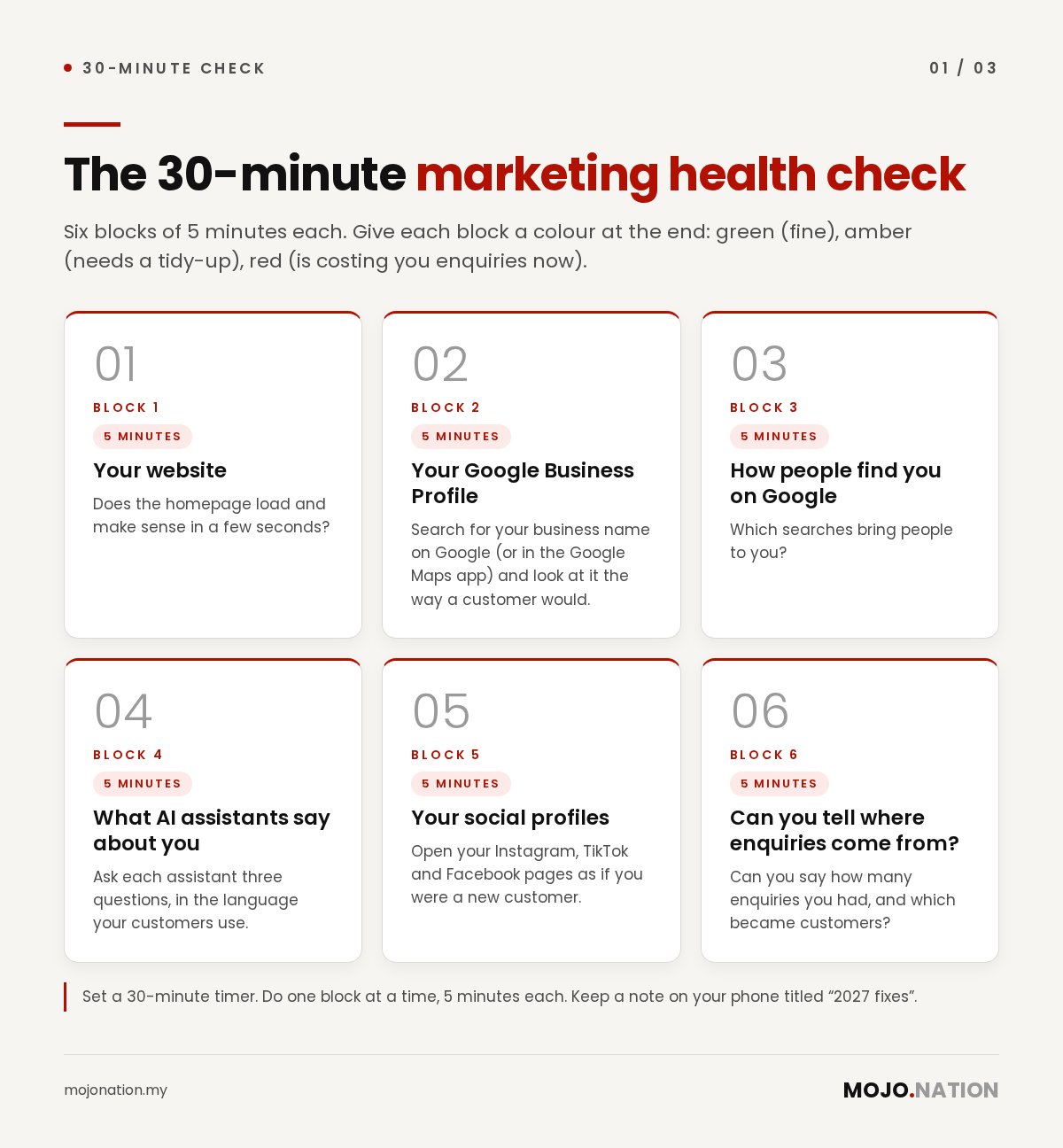
Block 1: Your website (5 minutes)
Open your website on your phone, not your laptop, because many of your customers will.
- Does the homepage load and make sense in a few seconds? Can a stranger tell what you do, where, and what to do next?
- Do the buttons work? Tap your WhatsApp button, phone number, booking link and contact form. Send yourself a test enquiry and check it arrives.
- Are your details correct? Check opening hours, address, phone number, prices and any dates. Old offers and out-of-date years in the footer or banners are common.
- Is it fast enough? Run your homepage through PageSpeed Insights. It reports on both mobile and desktop and shows Google's Core Web Vitals (LCP, CLS and INP). You don't need to understand every line; note which ones are flagged and pass the list to whoever manages your site.
Green: it loads, the buttons work, the details are right. Amber: a few outdated details or a slow page. Red: a broken form, button or contact detail. Fix red items first.
Block 2: Your Google Business Profile (5 minutes)
For most local businesses, this is the single most valuable page you own. Search for your business name on Google (or in the Google Maps app) and look at it the way a customer would. If you haven't set it up properly, start with our Google Business Profile checklist.
- Hours. Are your normal hours right? Google lets you set special hours for holidays and other temporary periods, so you can show the right hours over Christmas, New Year's Day, CNY and so on, without changing your regular hours.
- Category, phone number and website link. Does the main category describe what you mainly do? Do the phone number and website link work?
- Address or service area. If customers visit you, the pin should be right. If you go to customers and don't meet them at your address, Google lets you set a service area and choose not to show your address.
- Photos. Are the newest photos from this year? Does the first photo look like your business today?
- Reviews. Read your latest ones. Have you replied? Verified owners can reply to reviews; the reply is public and the reviewer is notified. Replies are public, so future customers can see how you respond, including to a bad review.
- How you ask for reviews. Share a link or QR code with every customer. Don't offer discounts, free items or payment in exchange for a review: Google's policy prohibits incentives for reviews, and such reviews can be removed. Our reviews guide for cafes and restaurants covers the right way to ask.
Green: hours, contact details and photos are current and recent reviews have replies. Amber: old photos, unanswered reviews. Red: wrong hours, a wrong phone number, or a closed or duplicate listing.
Block 3: How people find you on Google (5 minutes)
If your website is connected to Google Search Console (it's free), open the Performance report. It shows clicks, impressions, click-through rate and average position, and the default view covers the past three months.
Look at three things:
- Which searches bring people to you? Are they what you'd expect, such as your business name plus your service and area, or something surprising?
- Which pages get the clicks? Is it your homepage only, or are your service pages and blog posts being found too?
- Is anything missing? A service you sell that never appears in searches is a gap to fix with a clearer page.
No Search Console yet? Do a quick check without it: search `site:yourwebsite.com` on Google. Google's own help suggests this for small sites to see whether your key pages are indexed. If your homepage or a key service page doesn't appear, note it in your 2027 fixes.
Green: your key pages appear and you can see the searches that bring people in. Amber: no Search Console, or key pages missing from results. Red: your homepage doesn't appear when you search `site:yourwebsite.com`.
Block 4: What AI assistants say about you (5 minutes)
More people now ask an AI assistant such as ChatGPT, Gemini or Perplexity for recommendations, and Google shows AI-written summaries above some results. See what they say about you. Our guides on AI search visibility for Malaysian SMEs and getting recommended by ChatGPT explain the background.
Ask each assistant three questions, in the language your customers use:
- "What is [your business name]?"
- "What are the best [your service] in [your area]?" (for example, "best hair salon in Cheras")
- "Who offers [your main service] in Malaysia?"
Write down: Are you mentioned at all? Is what they say about you correct (services, location, hours, prices)? Who do they recommend instead?
Assistants can get things wrong, and results change from one day to the next, so treat this as a snapshot and not a ranking. If something is wrong, don't argue with the assistant. Find the source: usually an out-of-date website page, a directory listing or a Google profile that says something different. Fixing those places is what changes the answer over time.
One reassuring point from Google: the best practices for SEO remain relevant for its AI features such as AI Overviews, and there are no additional requirements or special optimisations needed to appear in them. Clear, accurate, consistent information about your business is the foundation.
Green: you're mentioned and the details are right. Amber: you're mentioned with wrong or old details. Red: you don't appear for anything, or an assistant describes a different business.
Block 5: Your social profiles (5 minutes)
Open your Instagram, TikTok and Facebook pages as if you were a new customer.
- Bio and link. Does the bio say what you do and where? Does the link go to a page that works today (and not an old promotion)?
- Contact route. Can people reach you through one clear route, such as WhatsApp, a booking link or a phone number? Does it match your website and Google profile?
- Latest posts. When did you last post? A page that looks abandoned makes people wonder if you're still open.
- Pinned or featured posts and highlights. Do they show your best work and current offers, or last year's?
- Messages and comments. Is anything waiting for a reply? Unanswered questions are lost customers.
If you need content ideas for the year-end rush, see our TikTok content ideas for cafes and F&B in Malaysia.
Green: profiles are current and someone replies. Amber: a stale bio, link or highlights. Red: unanswered messages, or a link that doesn't work.
Block 6: Can you tell where enquiries come from? (5 minutes)
You can't improve what you can't trace. Check whether you know where this year's enquiries came from.
- Ask. Add "How did you hear about us?" to your contact form, booking call or counter. Options like "Google", "Instagram or TikTok", "AI assistant", "a friend" and "other" are enough.
- Collect in one place. Messages arrive by WhatsApp, forms, calls and DMs. Pick one sheet, even a simple spreadsheet, where you log every enquiry with the date, source and outcome.
- Count last month. Can you say how many enquiries you had, and which became customers? If not, start the sheet today. A rough record beats none.
Green: you log enquiries and sources. Amber: you have some records but not the source. Red: you can't say where enquiries came from.
Score yourself: green, amber, red
Write the six colours in your note. A simple way to read them:
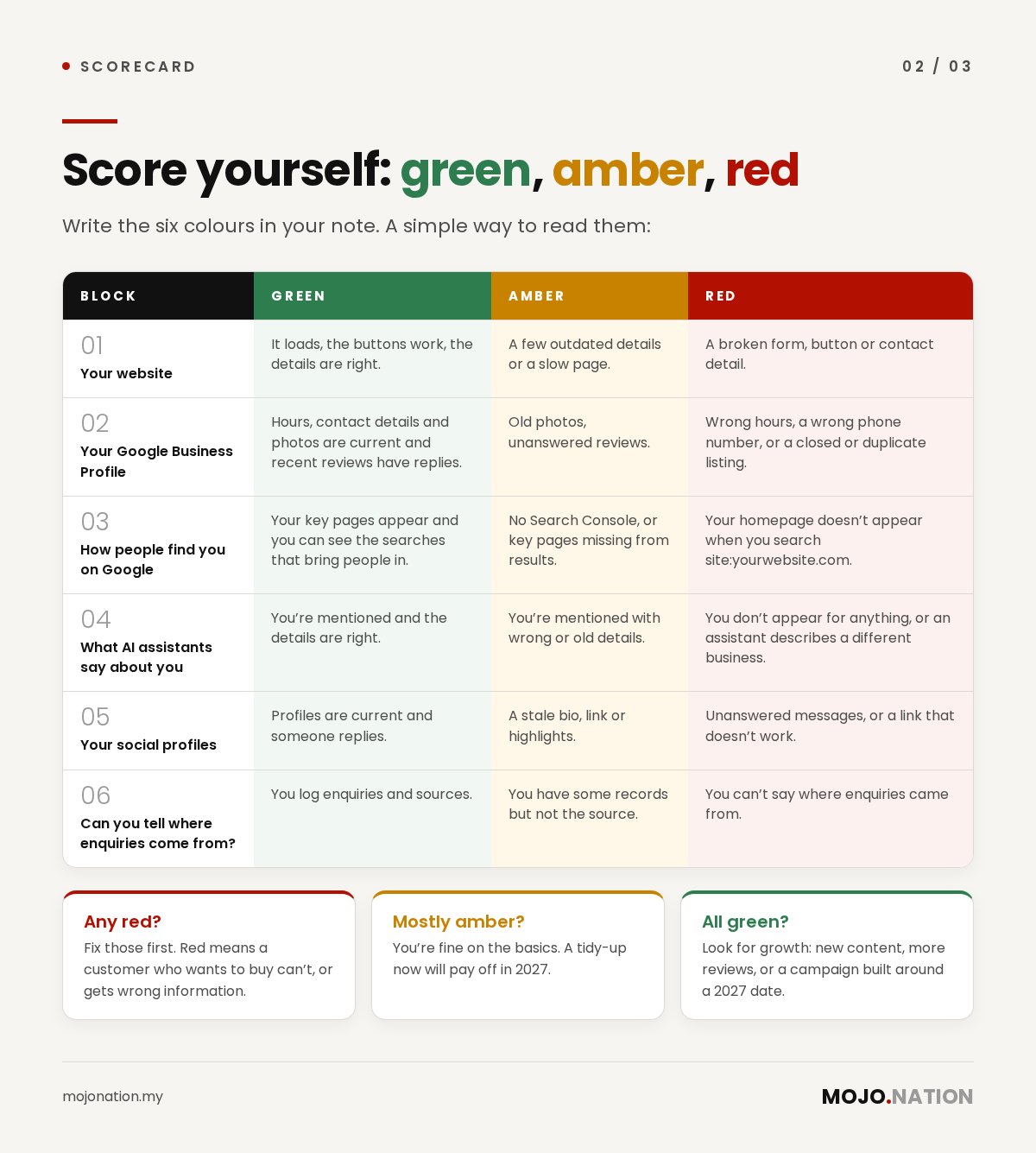
- Any red? Fix those first. Red means a customer who wants to buy can't, or gets wrong information.
- Mostly amber? You're fine on the basics. A tidy-up now will pay off in 2027.
- All green? Look for growth: new content, more reviews, or a campaign built around a 2027 date.
Dates to plan around in 2027
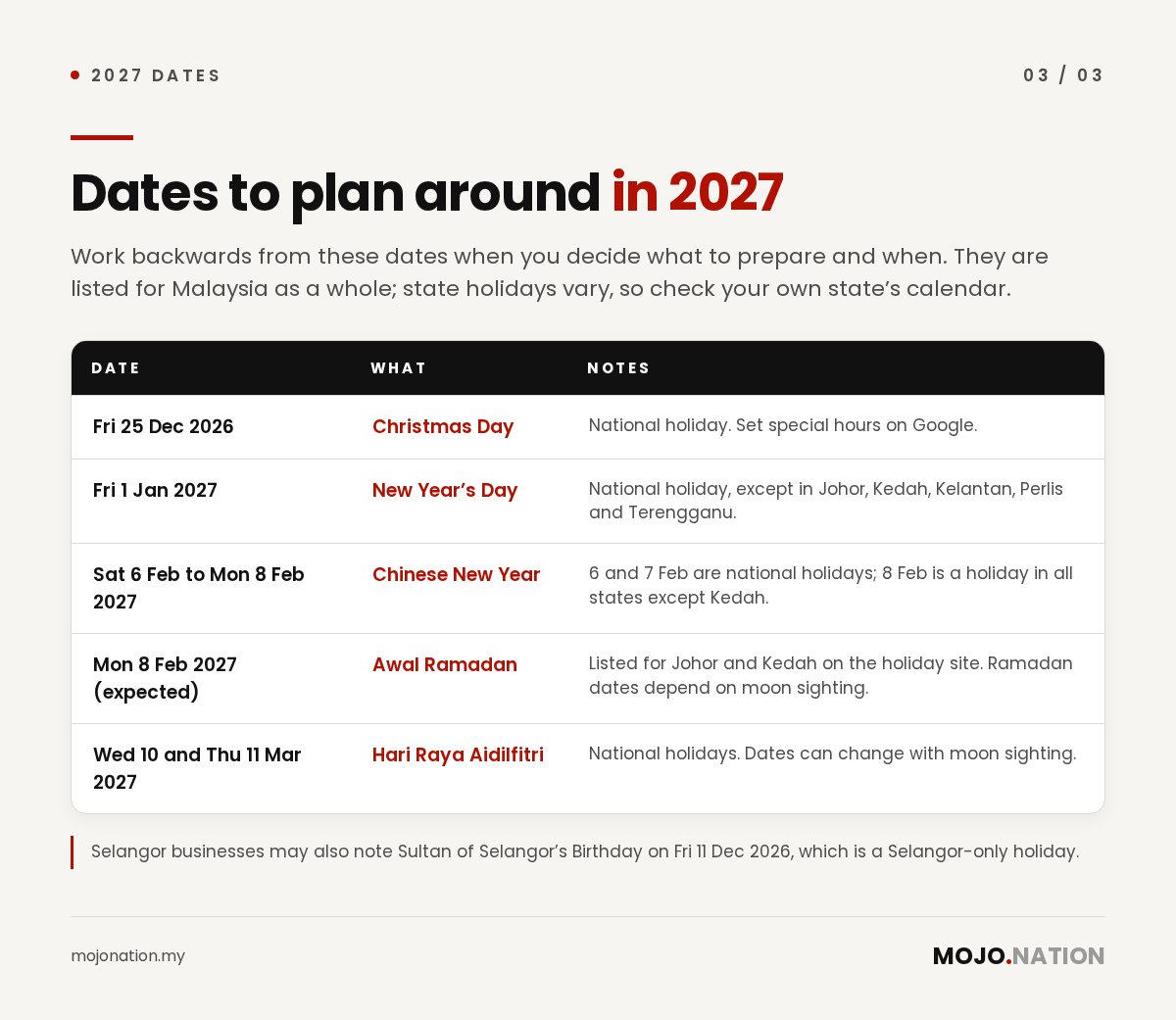
Work backwards from these dates when you decide what to prepare and when. They are listed for Malaysia as a whole; state holidays vary, so check your own state's calendar.
| Date | What | Notes |
|---|---|---|
| Fri 25 Dec 2026 | Christmas Day | National holiday. Set special hours on Google. |
| Fri 1 Jan 2027 | New Year's Day | National holiday, except in Johor, Kedah, Kelantan, Perlis and Terengganu. |
| Sat 6 Feb to Mon 8 Feb 2027 | Chinese New Year | 6 and 7 Feb are national holidays; 8 Feb is a holiday in all states except Kedah. |
| Mon 8 Feb 2027 (expected) | Awal Ramadan | Listed for Johor and Kedah on the holiday site. Ramadan dates depend on moon sighting. |
| Wed 10 and Thu 11 Mar 2027 | Hari Raya Aidilfitri | National holidays. Dates can change with moon sighting. |
Selangor businesses may also note Sultan of Selangor's Birthday on Fri 11 Dec 2026, which is a Selangor-only holiday.
For the sale peaks closer to now, our 11.11 and 12.12 content ideas are still useful for 12.12.
Pick your top three fixes
Look at your note and choose three fixes only, in this order:
- Anything red. Wrong hours, a broken button, a wrong phone number.
- Anything that affects trust. Unanswered reviews, an abandoned social page, outdated prices.
- Anything that helps you be found. Missing pages, an incomplete Google profile, wrong details that AI assistants are repeating.
Give each fix an owner and a date before the end of the year. Three finished fixes beat twelve half-started ones.
Common year-end mistakes
- Waiting for a "relaunch". Most problems here can be fixed in an afternoon.
- Changing everything at once. You won't know what worked. Fix a few things, then watch.
- Forgetting special hours. The easiest win on this list, and the one customers notice first.
- Asking for reviews with a reward. Google's policy prohibits it.
- Treating one AI answer as a ranking. Answers differ between assistants and between days. Look for patterns, and for facts that are wrong.
- Not measuring. Without a record of enquiries and where they came from, next year's budget is a guess.
FAQ
How long does a marketing health check take?
This one is designed for about 30 minutes: six blocks of 5 minutes each. A professional audit goes deeper, but a self-check is enough to catch the most common problems. If you request a free audit from us, we'll respond to your enquiry within 24 hours and deliver the audit within 48 hours.
Do I need Google Search Console?
It's not required for this check, but it's free and shows you the searches that bring people to your site. If you don't have it set up yet, use the `site:` search in Block 3 for now and add Search Console in 2027.
How do I show different opening hours over the holidays on Google?
In your Business Profile, set special hours for the date. Google's help says special hours are for holidays and other temporary periods, so you don't need to change your regular hours.
Should I check what ChatGPT says about my business?
Yes, as a snapshot. Ask a few simple questions, note what's right and wrong, and fix the source information on your website, Google profile and listings. Answers change over time, so repeat the check every few months.
Can I offer a discount for Google reviews?
No. Google's policy doesn't allow payment, discounts or free items in exchange for reviews, and such reviews can be removed. Ask politely and make it easy with a link or QR code.
Do I need separate things to appear in Google's AI Overviews?
Google says there are no additional requirements or special optimisations needed to appear in AI Overviews or AI Mode, and that the best practices for SEO remain relevant. Start with the basics: a fast site, accurate details and helpful content. Our Google AI Overviews guide explains more.
Want us to do it for you?
If you'd rather not spend the 30 minutes, or you've found red items and aren't sure how to fix them, start with a free audit. We review your SEO, how AI assistants like ChatGPT, Gemini and Perplexity currently describe your business, and your content, then send clear next steps. We'll respond to your enquiry within 24 hours, and the audit is delivered within 48 hours. It's free with no obligation, and we don't guarantee rankings or traffic. If you decide to start a package, our Year-End Booking Offer is: start by 31 Dec 2026 and we waive the RM800 setup fee plus optimise your Google Business Profile for free. Lock in 2026 pricing before the new year. Prices exclude SST. Packages have a 3-month minimum, then month to month. If AI answers about your business are wrong, our AI search optimisation service is the next step. Ready? Request your free audit.
How Mojo Nation writes our guides: we use public guidance from the platforms themselves and our own experience working with Malaysian businesses. Last updated: 18 November 2026.
Get a free audit
Free review of your social media, website and AI search visibility. No obligation.
More guides
TikTok vs Instagram Reels for Business in Malaysia: Which Should You Use?
Compare audience, content effort and sales fit, then pick which platform to start with, and how to reuse one video on both.
Read →
Local SEO for Malaysian Cafes and Restaurants: How to Show Up for "Near Me" Searches
A practical local SEO guide for Malaysian cafes and restaurants: Google Business Profile, menu, reviews, outlet pages and monthly checks, using Google's own rules.
Read →
TikTok Content Ideas for Cafes and F&B in Malaysia (No Big Budget Needed)
15 TikTok video ideas a cafe or restaurant team can shoot on a phone, with hooks in English and Bahasa Malaysia, plus music and disclosure rules.
Read →
Google Business Profile for Malaysian SMEs: A Complete Setup Checklist
A step-by-step checklist to set up and verify your Google Business Profile: name, categories, hours, photos, reviews and updates.
Read →
Google AI Overviews: What Malaysian Business Owners Need to Know
What AI Overviews are, how Google picks the websites it shows, and six practical steps to become a source it cites.
Read →
11.11 and 12.12 content ideas for Malaysian SMEs
TikTok and Instagram ideas, creator collabs and live timing for cafes, salons and shops, without discounting everything.
Read →
How to work with micro-KOLs in Malaysia: a step-by-step guide for SMEs
Find, brief and work with smaller creators, get disclosure right, and measure what matters. Includes our trial and retainer prices.
Read →
How to get your business recommended by ChatGPT
Practical, honest steps to improve the chances AI assistants like ChatGPT recommend your business.
Read →
SEO vs KOL marketing: why you need both
SEO captures demand; KOLs create it. How combining the two gives Malaysian brands compounding growth.
Read →
What is AI search visibility and why Malaysian SMEs should care
More customers ask ChatGPT, Gemini and Perplexity for recommendations. Here’s what AI search visibility means and how to start.
Read →